
WordPress 没有内置的"调用最新所有文章"短代码,需要自己在主题的 functions.php 里注册一个,然后就能在文章或页面里用 [latest_posts] 这样调用了。
把下面这段代码加到子主题的 functions.php 里,注意不要直接改父主题文件,不然主题一更新代码就没了:
// 注册最新文章短代码
function latest_posts_shortcode( $atts ) {
// 默认参数:显示全部已发布文章,按时间从新到旧
$atts = shortcode_atts( array(
'posts_per_page' => -1, // -1 表示查询全部文章
'orderby' => 'date',
'order' => 'DESC',
), $atts );

$args = array(
    'post_type'      => 'post',
    'post_status'    => 'publish',
    'posts_per_page' => $atts['posts_per_page'],
    'orderby'        => $atts['orderby'],
    'order'          => $atts['order'],
);

$query = new WP_Query( $args );
$output = '';

if ( $query->have_posts() ) {
    $output.= '<ul class="latest-posts-list">';
    while ( $query->have_posts() ) {
        $query->the_post();
        $output.= '<li><a href="'. get_permalink(). '">'. get_the_title(). '</a></li>';
    }
    $output.= '</ul>';
} else {
    $output = '<p>还没有发布任何文章。</p>';
}

wp_reset_postdata();  // 重要:重置查询,避免影响页面其他模块

return $output;

}
add_shortcode( 'latest_posts', 'latest_posts_shortcode' );
使用方法
- 显示全部文章:在文章或页面里直接写
[latest_posts]。 - 限制数量:写
[latest_posts posts_per_page="10"]只显示最新 10 篇。 - 按修改时间排序:写
[latest_posts orderby="modified"]把最新修改的排前面。
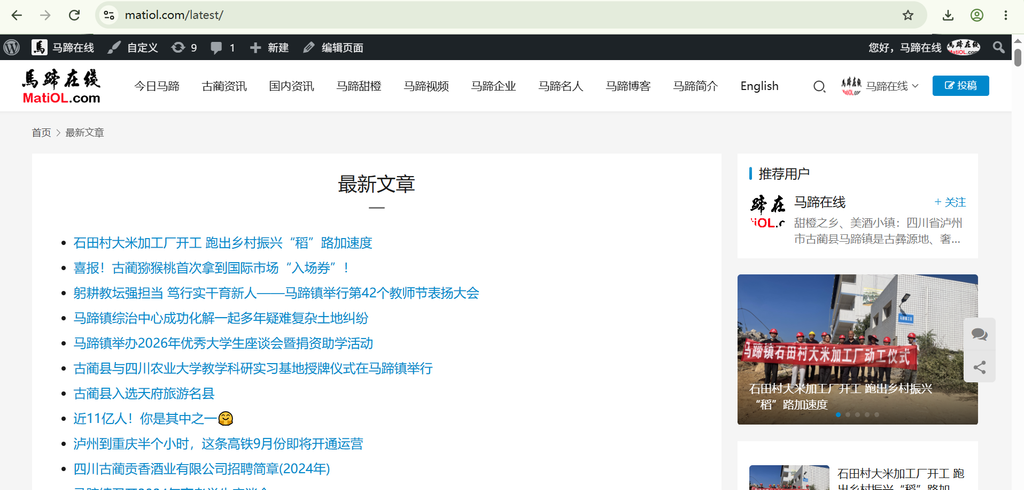
来看看马蹄在线调用最新文章后的效果:
微信扫描下方的二维码阅读本文